


Finding the best budget CDN is not about chasing the lowest number on a pricing page. The cheapest advertised rate per gigabyte can easily produce the most expensive monthly bill, because request fees, cache misses, origin egress, and regional surcharges all hide behind that headline figure — and a provider that is slow to configure or quick to throttle can cost you more in lost time and lost visitors than you ever saved on bandwidth. This guide looks at which low-cost CDNs are genuinely worth it in 2026, when a free tier is enough and when it will bite, and how to tell a real bargain from a false economy.
This is the buyer’s-shortlist companion to our full CDN pricing comparison, which breaks down the billing models and rate cards in detail. Here we assume you want cheap and are asking which cheap option to actually pick — so we focus on the shortlist and the decision, not the full pricing mechanics.
A note on the numbers: CDN pricing changes often and varies by region and volume. Every figure below is a published rate-card snapshot from mid-2026; treat it as directional and verify current rates on each provider’s own pricing page before deciding.
What “cheap” actually means for a CDN
Budget CDNs get to a low price in different ways, and the method tells you what you are trading away. Broadly, a cheap CDN is cheap for one of these reasons:
- Lean pricing model — a genuinely low per-GB rate with no request fees and simple billing (the budget pure-play approach). You trade some enterprise features and support depth for a low, predictable rate.
- Free tier as a funnel — a capable free plan that covers small sites, with paid upgrades for features rather than raw bandwidth. You trade granular control and premium routing for zero cost at small scale.
- Smaller or regionally focused network — fewer points of presence, or strength in specific regions, which keeps costs down but can mean slower delivery to audiences far from those PoPs.
- Bundled-in-cloud free tier — a hyperscaler’s introductory allowance that is cheap only while you stay small and in that ecosystem.
None of these is bad; each is a trade. The goal is to pick the trade that does not hurt your particular workload. A cheap CDN that is weak in Asia is a bargain for a European audience and a mistake for an Indian one.
Free tier or paid: which do you actually need?
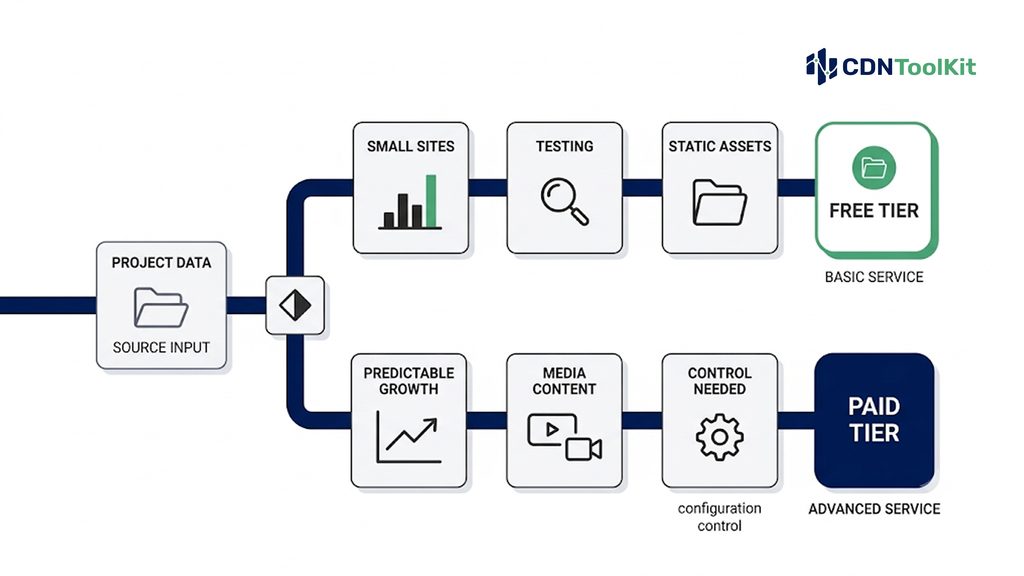
The first real decision is not which provider, but whether you need to pay at all. A free tier is genuinely enough when your needs are modest, and a false economy when they are not.
A free tier is enough when
- You run a personal site, blog, portfolio, or early-stage project with modest traffic.
- Your content is largely static and highly cacheable (images, CSS, JS, downloads).
- You need basic acceleration and basic DDoS protection, not fine-grained control.
- You are testing and measuring before committing to a paid plan.
You have outgrown free when
- You need granular cache rules, custom routing, or priority performance.
- You are delivering significant video or large files, where bandwidth economics dominate.
- You need real support and SLAs, not community forums, when something breaks.
- Free-tier throttling, acceptable-use limits, or less-efficient routing start to show up as slow pages for part of your audience.
The most common budget mistake is staying on a free tier past the point it serves you, and quietly losing visitors to slow delivery — a cost that never appears on any invoice. Measure your real performance before concluding free is fine.
The best budget CDNs in 2026
The providers below are genuinely low-cost and current as of 2026. They are grouped by the kind of budget buyer they suit, not ranked, because the cheapest option depends on your traffic shape and region. Each links to its pricing page so you can verify current rates, and all published figures are entry-tier NA/EU snapshots that change with volume and region.
Cloudflare — the free-tier default
Cloudflare offers an unmetered free plan that is the natural starting point for most small sites: CDN caching, TLS, HTTP/3, and basic DDoS protection at no cost, with paid tiers adding features rather than charging for bandwidth. For a personal or small-business site it is hard to beat zero. The limits appear as you grow and need granular control, advanced security rules, or specialized routing. Best fit: small sites and early projects that want capable acceleration for free.
Bunny.net — low, transparent pay-as-you-go
Bunny.net is a favorite budget pure-play: transparent per-GB pricing starting around $0.01/GB in NA/EU on its standard network (and lower on its volume network), no contracts, a roughly $1/month minimum, and an easy pull-zone setup. It suits cost-sensitive sites, image-heavy pages, and static or media delivery. The main caveat is regional pricing — rates rise outside NA/EU — so estimate by where your audience actually is. Best fit: budget-conscious sites and media projects with mainly NA/EU traffic.
KeyCDN — simple per-GB with no request fees
KeyCDN uses a single pay-as-you-go model starting around $0.04/GB in NA/EU (tiering down at higher volume), with free Let’s Encrypt SSL, instant purge, and — notably — no separate per-request fees, which helps for sites serving many small objects. There is a small monthly minimum and no free plan, and like most budget providers it prices Asia, Africa, and Latin America higher. Best fit: small-to-mid sites that want straightforward per-GB billing without request-fee surprises.
Gcore — a free tier with real testing room
Gcore stands out for a free allowance generous enough to run a real workload (around 1 TB of monthly traffic), plus free SSL and a broad international network with particular strength in gaming and streaming. Paid plans move to fixed bandwidth tiers. The pricing structure is less dead-simple than Bunny’s, but the meaningful free capacity lowers the risk of committing blind. Best fit: developers and small-to-mid projects that want to test seriously before paying.
CDN77 — flat commit pricing for mid-volume
CDN77 leans toward transparent commit-tier pricing with requests included in the rate, which can be very economical once you have steady, predictable mid-volume traffic (its single-plan tiers can undercut per-GB providers at higher sustained volumes, though they look expensive at very low volume). Best fit: sites with steady, predictable mid-range volume that want an all-in committed rate.
5centsCDN — low per-TB pricing for streaming-heavy budgets
5centsCDN publishes some of the lowest entry per-TB pricing in this set — a standard plan from roughly $2.5/TB (about $0.0025/GB) for NA/EU delivery, with worldwide tiers costing more — and bundles streaming-specific features (live, VOD, transcoding) that general budget CDNs do not. That makes it worth a look specifically for cost-sensitive streaming and media workloads. The honest trade-offs, as for every provider here: the headline rate is vendor-published rather than independently verified; the entry tier covers fewer regions (worldwide delivery sits on higher tiers); the global PoP footprint is smaller than the larger networks; and control-panel polish is still maturing. Best fit: cost-sensitive streaming/media projects that can verify regional coverage for their audience.
Free static-asset CDNs — for open-source and libraries
For a narrow but common case — serving open-source JavaScript, CSS, and font libraries — free public CDNs like jsDelivr deliver common packages at no cost from a global edge. They are not a substitute for a site-wide CDN, but for the specific job of loading shared libraries they are genuinely free and fast. Best fit: loading open-source libraries and public static assets, not your own application traffic.
The table summarizes fit and the key trade-off, not a ranking. All rates are entry-tier NA/EU snapshots; verify current pricing and weight it by your own region mix before deciding.
| Provider | Model | Entry cost (NA/EU, mid-2026) | Main trade-off to check |
|---|---|---|---|
| Cloudflare | Flat plan / free | Free tier; paid from a flat fee | Granular control/routing on free tier |
| Bunny.net | Pay-as-you-go | ~$0.01/GB (std); ~$1/mo min | Higher rates outside NA/EU |
| KeyCDN | Pay-as-you-go | ~$0.04/GB; ~$4/mo min | No free tier; regional pricing |
| Gcore | Free tier + tiers | ~1 TB/mo free; paid tiers | Pricing structure less simple |
| CDN77 | Commit tiers | Plan-based; requests included | Costly at very low volume |
| 5centsCDN | Per-TB (vendor-published) | ~$2.5/TB (~$0.0025/GB) | Vendor-published; regional coverage |
| jsDelivr | Free (public) | Free | Open-source libraries only, not site traffic |
Sources: provider pricing pages and the independent reference egresscost.com; 5centsCDN’s figure is vendor-published and not independently verified here. Entry-tier NA/EU rates, mid-2026, subject to change — verify before relying on them.
The false economy: when cheap gets expensive
[IMAGE 3: cheap-cdn-false-economy-hidden-costs.webp]
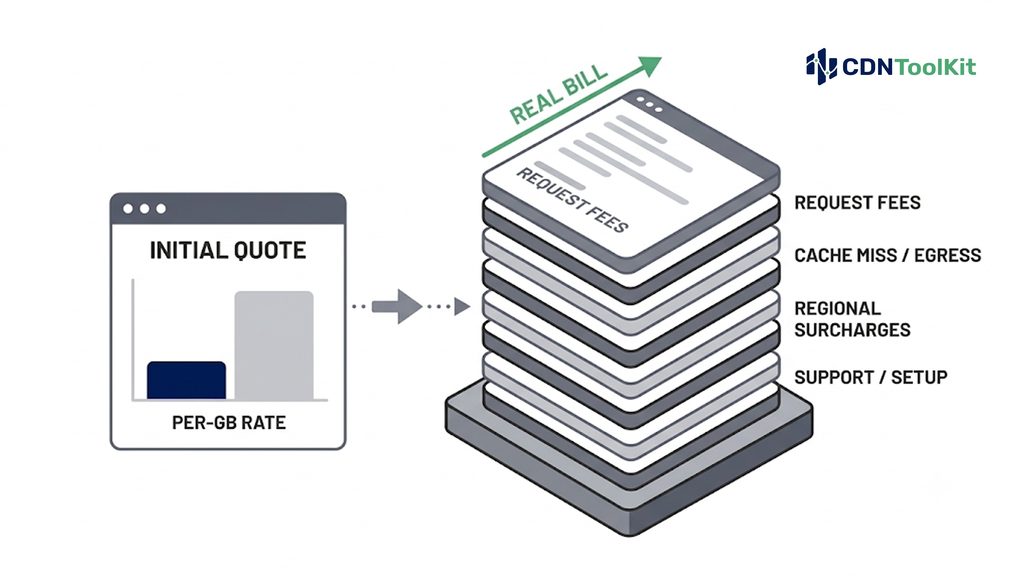
The whole point of choosing carefully is that a low per-GB rate is not the same as a low bill. Four things routinely turn a “cheap” CDN into an expensive one — our pricing comparison covers them in full, but in a budget context they are the traps to watch:
Request fees
Some budget providers that look cheap per GB add a per-request charge that dominates the bill for sites serving many small objects — an API, an e-commerce catalog, a page full of tiny images. Others (Bunny, KeyCDN, CDN77) fold requests into the rate. If your payloads are small, the request-fee line matters more than the per-GB rate.
Cache misses and origin egress
A cheap CDN only saves money on what it actually caches. If your content caches poorly — query-string churn, misconfigured TTLs, highly dynamic responses — a large share of requests fall through to your origin, which both slows delivery and triggers a separate origin-egress bill from your host. A low cache-hit ratio quietly doubles your costs. Cache-hit ratio is a budget metric, not just a performance one.
Regional surcharges
Every budget pay-as-you-go CDN prices NA/EU cheapest and charges meaningfully more for Asia, South America, the Middle East, Africa, and India — sometimes several times more. A rate that looks unbeatable for a European audience can be mediocre for a global one. Weight the quoted rate by where your traffic lands.
Time, support, and throttling
The costs that never appear on an invoice: hours lost to a clunky setup, slow or community-only support when something breaks during an incident, and free-tier throttling or routing that silently loses you visitors. A slightly higher rate that saves a day of engineering time or prevents an outage is often the cheaper choice overall.
How to choose a budget CDN without regretting it
A short, honest process beats picking the lowest sticker rate:
- Estimate your real volume and region mix — monthly GB out, split by where your audience is. Apply each provider’s regional rates, not just the NA/EU headline.
- Count your requests — if you serve many small objects, prioritize providers that include requests in the rate, and compute the request line explicitly for those that don’t.
- Check your cacheability — a high cache-hit ratio is what makes a cheap CDN actually cheap. If you don’t know yours, measure it before committing.
- Use the free tier or trial to test — most budget providers offer a free plan or trial; run real traffic and measure startup time and rebuffering from your audience’s regions before you pay.
- Weigh the non-invoice costs — setup effort, support quality, and documentation. For a small team, an hour saved is worth more than a fraction of a cent per GB.
For budget video and streaming specifically — where bandwidth economics and cache behavior dominate the bill — our video streaming CDN guide covers the delivery-side criteria that interact with cost.
Because the lever that most determines whether a cheap CDN stays cheap — cache-hit ratio and real delivery performance across regions — is something you measure rather than assume, ongoing monitoring pays for itself here. If you want to track how efficiently a budget provider actually caches and delivers your traffic over time, independent monitoring is what we do at CDNToolkit, and teams comparing real delivery efficiency across low-cost CDNs can get in touch here.
The bottom line
The best budget CDN is the one whose trade-offs miss your weak spots. For a small or static site, a capable free tier like Cloudflare’s is often all you need. For cost-sensitive pay-as-you-go at NA/EU scale, Bunny.net and KeyCDN are strong, with KeyCDN avoiding request fees; Gcore earns its place on a genuinely usable free allowance; CDN77 rewards steady mid-volume traffic; 5centsCDN is worth a look for cost-sensitive streaming; and free public CDNs cover open-source libraries. The one rule that matters: judge the effective cost per delivered GB — after requests, cache misses, region weighting, and the time your team spends — not the number on the pricing page. Cheap that performs is a bargain; cheap that loses you visitors is the most expensive option there is.
Frequently asked questions
What is the best budget CDN in 2026?
It depends on your traffic shape and audience location, not a single winner. For a small or static site, Cloudflare’s free tier is usually the best starting point. For cost-sensitive pay-as-you-go traffic in North America and Europe, Bunny.net (around $0.01/GB) and KeyCDN (around $0.04/GB, no request fees) are strong. Gcore offers a genuinely usable free allowance for testing, CDN77 suits steady mid-volume traffic, and 5centsCDN publishes very low per-TB rates for streaming-heavy budgets. Measure your own volume, requests, and cache-hit ratio before deciding.
Is a free CDN good enough for my website?
For a personal site, blog, portfolio, or early-stage project with mostly static, cacheable content and modest traffic, a free tier like Cloudflare’s is usually plenty — you get acceleration, TLS, and basic DDoS protection at no cost. You’ve outgrown free when you need granular cache or routing control, you’re serving significant video or large files, you need real support and SLAs, or free-tier throttling and routing start showing up as slow pages for part of your audience. The honest test is to measure your real performance rather than assume.
Why can a cheap CDN end up costing more?
Because the per-GB rate is only one line of the bill. Per-request fees can dominate for sites serving many small objects; a low cache-hit ratio sends traffic back to your origin and triggers a separate origin-egress charge; regional surcharges make a cheap NA/EU rate expensive for a global audience; and non-invoice costs — clunky setup, weak support during an incident, free-tier throttling that loses visitors — can dwarf the bandwidth savings. Always compare effective cost per delivered GB, not the headline rate.
Which cheap CDN has no request fees?
Several budget providers fold requests into their per-GB rate rather than charging separately, including Bunny.net, KeyCDN, and CDN77. That matters most if you serve many small objects — an API, a catalog, or image-heavy pages — where per-request charges on other providers can exceed the bandwidth cost. Always confirm on the provider’s current pricing page, since billing details change.
How cheap can a CDN realistically be?
Published entry rates in North America and Europe reach roughly a cent per GB on budget pay-as-you-go providers (Bunny.net around $0.01/GB), with volume and per-TB plans going lower still, and genuinely free options for small sites (Cloudflare’s free tier) and for open-source libraries (public CDNs like jsDelivr). But the realistic floor for your bill depends on your cache-hit ratio, request pattern, and region mix — the sticker rate is the start of the estimate, not the end.
Does a cheaper CDN mean worse performance?
Not necessarily. Several budget CDNs post latency competitive with premium providers in their strong regions. The usual trade-offs are a smaller or regionally concentrated network (slower delivery to far-away audiences), less granular control and premium routing, and thinner support — not raw speed in their core markets. The practical approach is to test a candidate from your audience’s actual regions on a free tier or trial before committing, rather than assuming cheap equals slow.
Should I use a budget CDN for video streaming?
You can — several budget providers (Bunny.net, 5centsCDN) are used for streaming at low per-GB or per-TB rates. The things to verify for video specifically are cache behavior on your segment files, origin-shielding to protect your origin under load, consistent delivery to your audience’s regions, and adequate concurrency handling. Because video bandwidth economics dominate the bill, a slightly cheaper rate that caches poorly can cost more than a slightly higher one that caches well; measure before you commit.