


Choosing the best CDN for video streaming is less about picking a famous name and more about matching a delivery network to the way your video actually behaves. Video is the most demanding thing most platforms serve: it is continuous, bandwidth-heavy, and unforgiving of delay. A content delivery network that looks excellent for a static website can still deliver a stuttering, high-latency experience for live sport or a large on-demand catalog. This guide takes a measurement-first approach — first defining what a good video streaming CDN has to do, then comparing the leading providers against those criteria so you can judge them on evidence rather than marketing.
We deliberately separate two questions that most comparison pages blur together: what makes a CDN good for video, and which providers deliver on it. Get the first right and the second becomes a straightforward evaluation instead of a leap of faith.
Why a video streaming CDN is a different problem
A regular website asks a CDN to cache a few hundred kilobytes and serve it quickly. Video asks for something harder. A single hour of adaptive-bitrate video can generate thousands of small segment files across multiple quality renditions, all of which must arrive in order, on time, and without gaps. If a segment is late, the player either freezes (a rebuffer) or drops to a lower quality. Either way the viewer notices immediately.
The stakes are well documented. Streaming-performance research has consistently found that viewers abandon streams as startup delay and rebuffering rise, and that even small increases in interruption correlate with measurable drops in watch time. The exact figures vary by study, audience, and content type, so treat any single percentage you see quoted with caution — but the direction is not controversial: playback smoothness is the single biggest driver of whether people keep watching. That is why, for video, the delivery layer matters more than the player skin or the codec argument your team had last week.
Think of it like a water supply rather than a mailbox. A mailbox just needs each letter to arrive eventually. A water supply has to maintain constant, even pressure — a brief drop is felt instantly at the tap. A video CDN is plumbing, not postal delivery, and it has to hold pressure across a global audience at once.
How video actually travels from origin to viewer
Before comparing providers, it helps to know the path a stream takes, because every provider difference maps onto one of these hops.
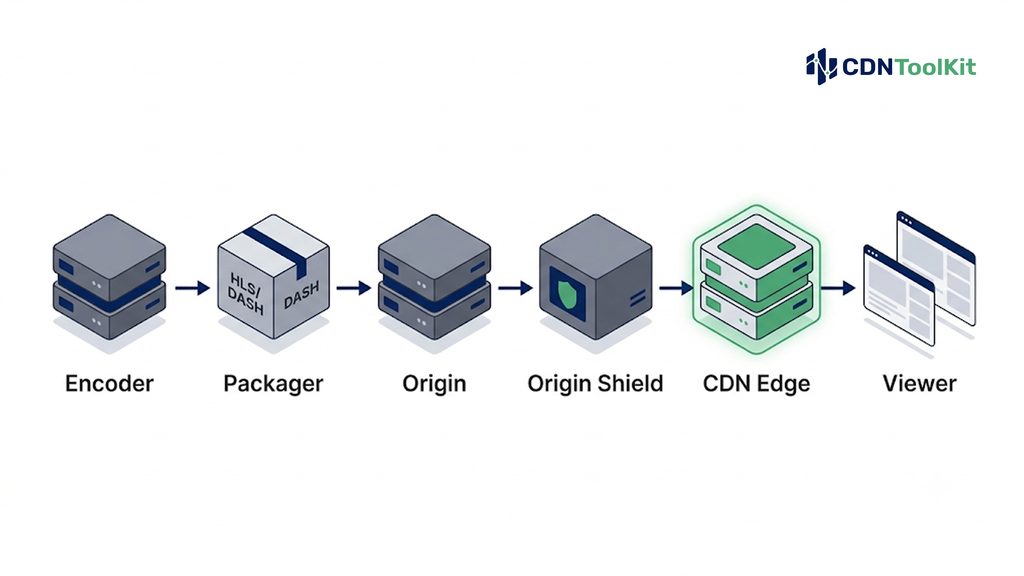
- Encoder — compresses the source into multiple bitrate renditions (for example 240p up to 4K) so the player can adapt to each viewer’s connection.
- Packager — wraps those renditions into a streaming format, almost always HLS or MPEG-DASH, chopped into short segments described by a manifest.
- Origin — the authoritative store of every segment and manifest.
- Origin shield — an optional intermediate cache tier that absorbs duplicate requests so the origin is not hammered when many edges ask for the same segment at once.
- CDN edge — the network of points of presence (PoPs) that cache segments close to viewers and serve the vast majority of requests.
- Viewer and player — requests segments, adapts bitrate, and reports the quality-of-experience data you should be measuring.
The two formats worth knowing by name are HLS and DASH. HLS, originally created by Apple and documented in IETF RFC 8216, is the most widely supported protocol and plays natively on Apple devices. MPEG-DASH, standardized as ISO/IEC 23009-1, is codec-agnostic and popular outside the Apple ecosystem. Increasingly both are packaged from a single set of files using CMAF (the Common Media Application Format), which — combined with chunked transfer — is what makes sub-three-second low-latency live practical without proprietary tooling. You can read the origin of HLS and its versions on its Wikipedia entry for background.
The five metrics that actually decide video quality
If you want to evaluate any provider claiming to be the best CDN for video streaming, these are the numbers to demand — from a test against your own traffic, not a vendor slide.
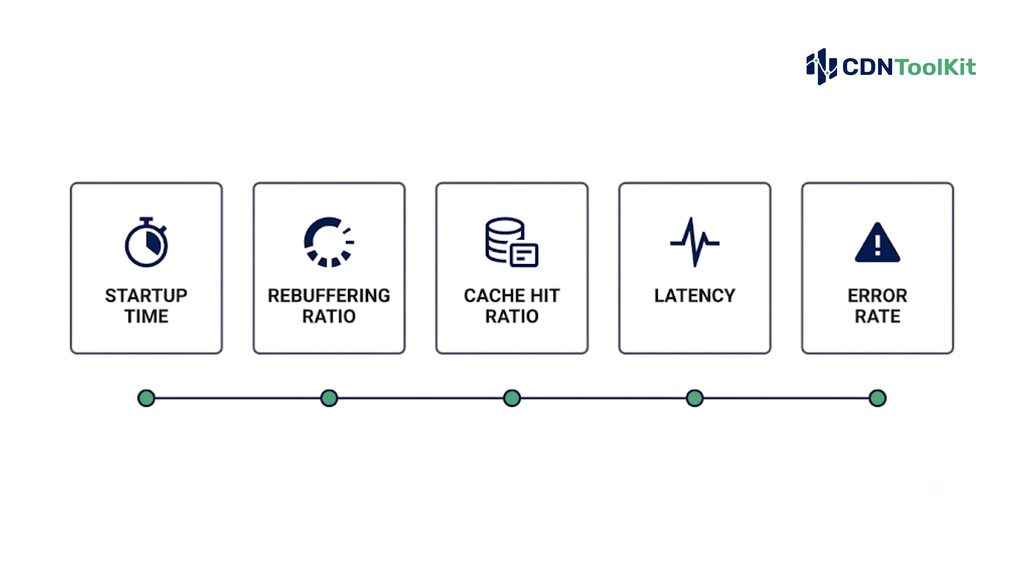
1. Startup time (time to first frame)
How long between pressing play and seeing video. This is shaped by DNS resolution, connection setup, manifest fetch, and how quickly the first segments are served from a nearby edge. Measure it at the median and at the 95th percentile — the slow tail is where you lose people.
2. Rebuffering ratio
The share of viewing time spent stalled and waiting. This is the metric most tightly linked to abandonment, and it is dominated by whether the edge can keep segments flowing without dipping to the origin at the wrong moment.
3. Cache hit ratio (at the segment level)
The proportion of segment requests served from the edge rather than fetched upstream. A high hit ratio means lower latency, less origin load, and lower cost. Crucially, measure it at the segment level, not just the manifest level — a deep catalog with a long tail of rarely watched titles behaves very differently from a single hot live channel.
4. Glass-to-glass latency (for live)
The delay between something happening in front of the camera and appearing on the viewer’s screen. For interactive or betting-adjacent live this can be decisive; for a film library it barely matters. Match the target to the use case rather than chasing the lowest possible number, because aggressive low latency shrinks the player’s safety buffer and raises sensitivity to network wobble.
5. Error rate under load
The frequency of failed segment requests, especially during peak concurrency. A network that looks flawless in a quiet test can fail during your biggest event. Test at forecast peak — and a little beyond it.
A useful rule from the measurement community: always evaluate in outcomes, not vanity figures. A provider quoting a huge PoP count or a headline cache-hit percentage has told you nothing until you see startup time, rebuffering, and error rate on your content, from your viewers’ regions.
Capabilities that separate a video CDN from a generic one
Raw delivery speed is necessary but not sufficient. These features are what make a network genuinely suited to video rather than merely fast:
- Format and protocol support — native HLS and DASH, ideally via CMAF, plus the low-latency variants if you run live.
- Ingest options for live — contribution protocols such as RTMP, and increasingly SRT, WebRTC/WHIP, Zixi, or RIST for reliable low-latency contribution over imperfect networks.
- Origin shielding and request collapsing — to protect the origin when many edges miss the same segment simultaneously.
- Fast, granular purge — so a bad or stale segment can be invalidated quickly during a live event.
- Content protection — token authentication, geo-blocking, signed URLs, and DRM integration for premium or rights-restricted content.
- Real-time analytics and logs — segment-level delivery data and player QoE, delivered fast enough to diagnose a problem while it is happening.
- Transparent, video-shaped pricing — bandwidth-heavy workloads need predictable per-TB economics, not surprise egress and request charges.
How the leading video CDNs compare in 2026
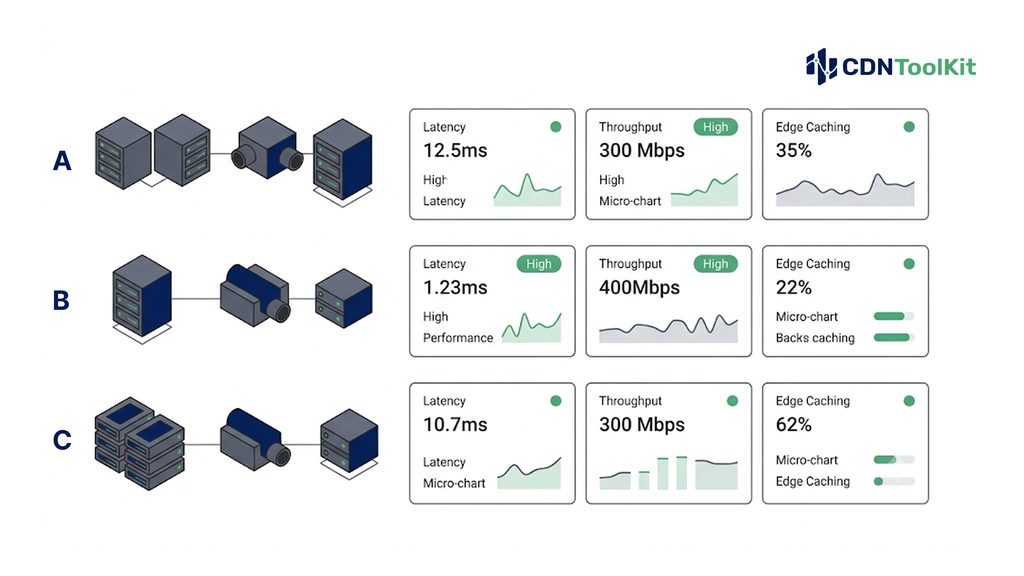
The providers below all deliver video at scale and are current as of 2026. They are grouped by the kind of team they suit, not ranked one-to-ten — because, as the metrics above make clear, the best CDN for video streaming genuinely depends on your workload. Test any shortlist against production-like traffic before committing. Every provider links to its official site so you can verify current specifications directly.
Akamai — the enterprise incumbent
Akamai carries an enormous share of the world’s live broadcast traffic and remains the default for major broadcasters. Its media-delivery products come with dedicated solution architects, 24/7 operations support, and SLA structures built for procurement teams at large organizations. The trade-off is contractual complexity — minimum commitments and longer terms — which tends to make sense above a substantial monthly spend and to feel like overhead below it. Best fit: global live, linear, and large VOD operations that need a single accountable vendor with deep support.
Amazon CloudFront — the AWS-native choice
Amazon CloudFront wins on integration rather than price. If your origin is already in AWS — S3, MediaPackage, MediaLive — then logging, access control, and edge functions slot in with very little glue. Pricing is usage-based and steps down with volume and private agreements, but egress economics at high scale require modeling carefully, including origin transfer and request charges. Best fit: teams whose video pipeline already lives inside AWS and who value operational cohesion.
Cloudflare — unified edge and programmability
Cloudflare offers a single network where the CDN, security, edge compute (Workers), storage (R2), and a managed video product (Cloudflare Stream) share one control plane and one bill. For teams that want token authentication, geo-fencing, and request-level logic wired into the same pipeline as delivery, that consolidation removes a lot of vendor sprawl. The main limitation to test is purge granularity on lower tiers if you manage fast-rotating live content. Best fit: teams wanting programmable delivery plus security in one platform.
Fastly — purge speed and cache precision
Fastly is favored by engineering-led teams that treat cache correctness as a reliability concern. Its near-instant global purge and fine-grained control over cache keys and surrogate grouping are strong assets for adaptive streaming with frequent mid-stream changes such as ad insertion. It is not the cheapest option at very high volume, and its programmable control assumes the in-house skill to use it well. Best fit: low-latency live and teams that need surgical, fast cache control.
Bunny.net — simplicity and fast rollout
Bunny.net emphasizes low, transparent pricing and speed of setup, with a dedicated video product (Bunny Stream) for encoding, delivery, and a player. The lack of contract minimums makes it attractive to startups, creator platforms, and small-to-mid VOD services that want a working pipeline quickly. The limits show at the top end: less edge-programmability and shallower real-time analytics than the enterprise networks. Best fit: teams that value time-to-first-delivery and predictable low pricing over deep customization.
5centsCDN — cost-focused streaming and OTT delivery
5centsCDN is a streaming-oriented CDN aimed at broadcasters, OTT providers, and media teams that want video delivery without enterprise contracts. Its live streaming stack supports HLS and MPEG-DASH output, adaptive bitrate up to 4K, and a broad set of contribution protocols including RTMP, SRT, WebRTC/WHIP, Zixi, and RIST, plus DVR/nDVR, scheduled and simulated-live playlists, and built-in SSAI for monetization.
Content protection covers token authentication, geo-blocking, IP filtering, and SSL. Published pricing starts low on a per-TB basis, which suits bandwidth-heavy catalogs. The honest trade-offs relative to the largest networks: a smaller global PoP footprint (in the region of 70+ PoPs versus hundreds for the incumbents), less edge-compute programmability than Fastly or Cloudflare, and control-panel usability that reviewers have flagged as improving but not yet best-in-class. Best fit: cost-sensitive OTT and live/VOD operators who want streaming-specific features at pay-as-you-go pricing and will validate regional performance for their audience.
The table below summarizes fit, not a league position. Performance depends on geography, audience, bitrate, protocol, cache state, and configuration, so use it to build a shortlist to test — not to skip testing.
| Provider | Category | Strongest for | Main thing to test |
|---|---|---|---|
| Akamai | Enterprise media CDN | Global live/linear + large VOD, deep support | Contract terms vs. your spend level |
| Amazon CloudFront | Cloud-native CDN | AWS-integrated pipelines | Full egress + request cost at scale |
| Cloudflare | Unified edge platform | Delivery + security + edge logic in one | Purge granularity on your tier |
| Fastly | Programmable media CDN | Low-latency live, cache precision | In-house skill to use the control |
| Bunny.net | Simple low-cost CDN | Fast launch, startups, small-mid VOD | Analytics depth + scale ceiling |
| 5centsCDN | Streaming-focused CDN | Cost-sensitive OTT, live + VOD | Regional PoP coverage for your audience |
How to run a valid video CDN test before you commit
A comparison that only measures peak throughput from one region is close to useless for video. A meaningful proof of concept looks like this:
- Use real content, not one clip — include 4K, multiple audio tracks, and subtitles to stress cache-key diversity across your actual catalog shape.
- Measure from your audience’s regions — instrument startup time and time-to-first-byte from at least three geographies that match your real viewers, at both median and 95th percentile.
- Test cold and warm caches — a long-tail VOD library will show very different hit rates than a hot live channel.
- Stress the origin — run with and without origin shielding to quantify real offload, and simulate synchronized misses to see how the origin holds up.
- Test purge under load — during simulated peak, purge a live segment and count how many stale fetches occur before it propagates.
- Cost the whole picture — compare effective cost after the test month including overages, origin egress, shield transfer, and per-request charges. The headline per-GB rate is never the full story.
Even a short test that mirrors 5–10% of production traffic via weighted DNS will tell you more than any vendor deck. The provider that clears your stop conditions — peak handling, origin protection, acceptable startup and rebuffering, and total cost — is your best CDN for video streaming, regardless of which name carries the most brand weight.
If you would rather track these differences continuously rather than run a one-off test, independent monitoring of provider performance across regions is what we do at CDNToolkit — teams who want to compare startup time, rebuffering, and latency across CDNs on an ongoing basis can get in touch here.
The bottom line
There is no universal winner. In AWS-centric pipelines, CloudFront removes integration friction; for global broadcast with heavy support needs, Akamai remains a safe default; when you need programmable delivery and fast purge, Cloudflare and Fastly lead; for fast, low-cost rollout, Bunny.net and 5centsCDN are worth shortlisting, with 5centsCDN adding streaming-specific features like flexible ingest and built-in monetization. The right choice is the one whose measured behavior on your traffic — startup time, rebuffering, cache hit ratio, latency, and error rate under load — clears the bar your audience actually feels. Define those thresholds first, test against them, and let the numbers pick the provider.
Frequently asked questions
What is the best CDN for video streaming in 2026?
There is no single best CDN for video streaming — it depends on your workload. In AWS-native pipelines, CloudFront reduces integration overhead; for global live and linear broadcast with heavy support requirements, Akamai is a common default; for programmable delivery and fast purge, Cloudflare and Fastly stand out; and for cost-sensitive OTT or live/VOD, Bunny.net and 5centsCDN are worth testing. The best choice is the provider whose measured startup time, rebuffering, and error rate on your own traffic meet your targets.
What is the difference between a video CDN and a video platform?
A video CDN primarily delivers packaged media (HLS or DASH segments) from an origin to viewers. A video platform, or online video platform (OVP), bundles more of the workflow — ingest, encoding, storage, a player, analytics, and delivery — into one product. Compare within category first: a low per-GB delivery rate does not describe the cost or capabilities of a full platform, and vice versa.
Which streaming protocol should a CDN support — HLS or DASH?
Ideally both. HLS (defined in RFC 8216) is the most widely supported protocol and is native on Apple devices, while MPEG-DASH (ISO/IEC 23009-1) is codec-flexible and common elsewhere. Modern workflows increasingly package both from a single set of files using CMAF, which also underpins low-latency live. Any CDN you consider for video should handle HLS and DASH cleanly.
How do I measure whether a CDN is good for video?
Focus on five metrics measured against your own content and audience: startup time (time to first frame), rebuffering ratio, segment-level cache hit ratio, glass-to-glass latency for live, and error rate under peak load. Measure at both the median and the 95th percentile, and from the regions where your viewers actually are. Vanity figures like raw PoP counts tell you little on their own.
Do I need a multi-CDN strategy for video?
Not always. Multi-CDN adds real resilience and can optimize cost and regional performance, but it also adds operational complexity — steering logic, consistent security, unified telemetry, and rehearsed failover. It tends to pay off at higher volumes or when the value of avoiding any single outage is high. Below that, one well-tested provider is often the better engineering choice.
How much does a video streaming CDN cost?
Cost depends on delivered volume, geography, peak concurrency, and extras such as origin egress, storage, encoding, requests, logging, security, and support. Published per-TB or per-GB rates range widely — from a few dollars per TB on cost-focused providers to negotiated enterprise pricing — but the headline rate is only one line. Normalize every quote to the same workload and include origin and request charges before comparing.
What causes buffering, and can a CDN fix it?
Buffering happens when the player runs out of downloaded video before the next segment arrives, usually due to slow segment delivery, low cache hit ratios that force origin fetches, or network congestion near the viewer. A good CDN reduces it by caching segments close to viewers, maintaining a high segment-level hit ratio, and protecting the origin — but encoding choices, bitrate ladders, and the viewer’s own connection also play a part.